
On a Mac, press Control-Tab to switch to the tab on the right in Safari. Press Control-Shift-Tab to switch to the tab on the left.
| What you want to do | Safari shortcut |
|---|---|
| Switch to the tab on the right | Control-Tab |
| Switch to the tab on the left | Control-Shift-Tab |
| Jump to tabs 1–8 | Command-1 through Command-8 |
| Jump to the last tab | Command-9 |
Safari also accepts Shift-Command-] for the tab on the right and Shift-Command-[ for the tab on the left. Apple lists these commands in its Safari keyboard shortcut guide.
Go back to the tab you previously used
Safari’s shortcuts follow the position of tabs in the tab bar. They do not return to the tab that was active most recently. To go back to the previously used tab, you need a Safari extension such as TabBack for Safari.
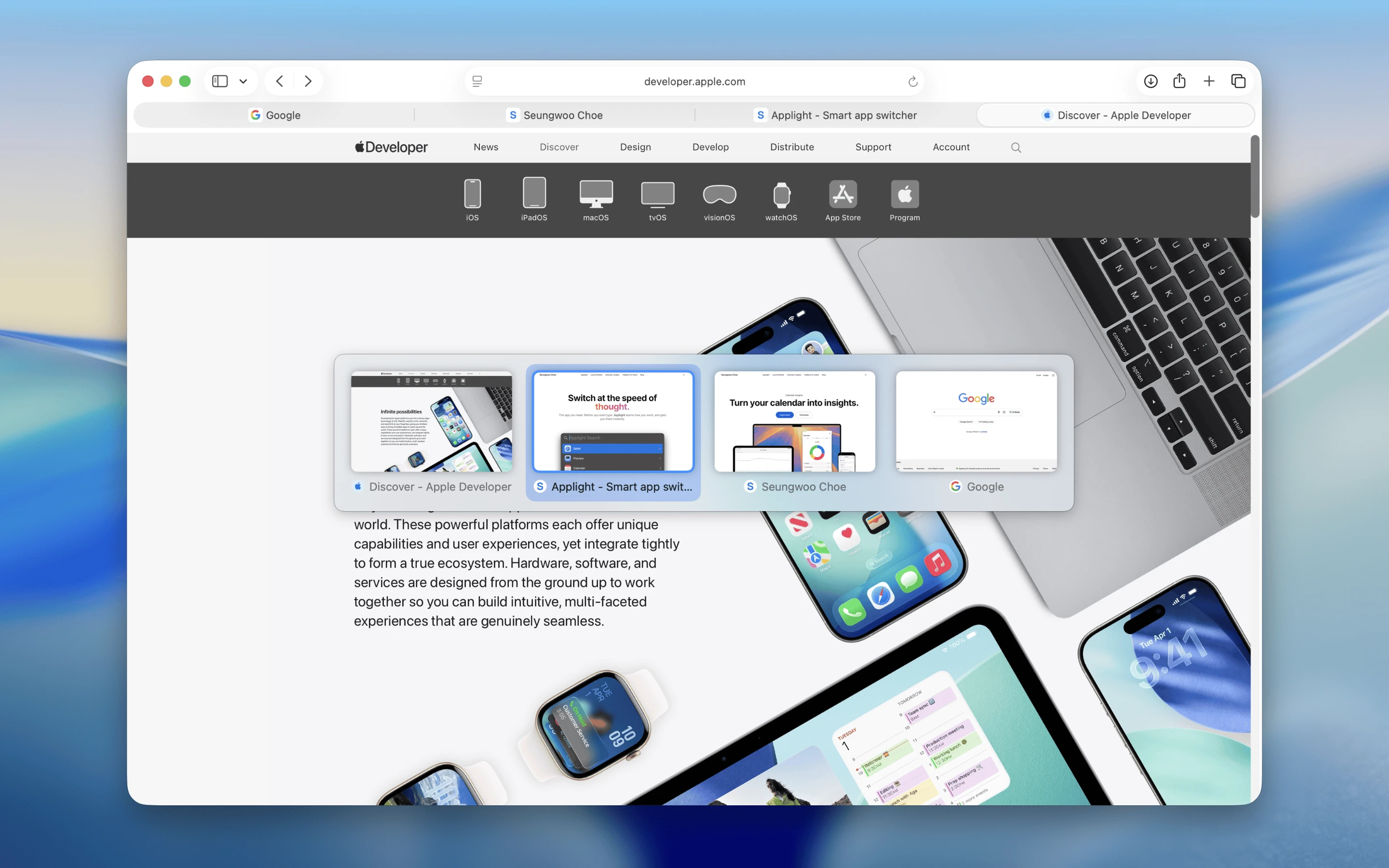
TabBack shows Safari tabs in recent-use order.
TabBack adds that missing shortcut. Press once to return to the tab you just used, press again to switch back, or keep pressing to browse further through your recent tabs. Visual previews help you recognize the right page without leaving the keyboard.
If Command-1 through Command-9 do not switch tabs
Open Safari > Settings > Tabs, then turn on Use ⌘-1 through ⌘-9 to switch tabs.